Showing posts with label Project. Show all posts

Tuesday, 8 December 2020

Beta

 "Beta"

The game has finally come to an end, wo, what a ride!!!. At the beginning I was dreading this process, I thought my opinion would change, no, it hasn't. I'm so happy that this is done, anyway let's get in to the real stuff.

So from the get go, I said my game was going to be extremely basic, I wasn't going to kill myself trying to make this because I have no interest in making games, not yet anyway. I spent ages trying to add extras to my game this week, and after hours and no results, I said no, and said "I'm done", and closed my laptop and went and ate a whole share size bag of Doritos chili heatwave, that made me feel amazing, for ten minutes and after I felt terrible.

But in my opinion I reached my target, depending on the person, goals and targets range in levels, my game is basic, I just wanted to make a game that works, let alone looks good, you can't always get the best of both worlds!! My game is what I said it was going to be, a game where you run and jump over obstacles and if you hit one, you die.


Image Source: Unity Screenshot

A lot of things went wrong during the game creation process, as would happen with anything, but a lot of things went right and that meant me crying less to myself in my room wanting to smash my laptop against my wall and say screw this, "I never wanted to make a game anyway", but I worked through a lot of the wrongs, the game is very basic, other students games are way better made than mine and I'm ok with that. I'm still very confused when reading code, and not understanding what code goes where and why it doesn't work, so Shaun if you've read this far, NO GAME DEVELOPMENT IN SEMESTER 2!!!! please and thank you. I met the targets I set myself weekly, so that made this process more easy, seeing that progress, week by week makes you want to quit less. 

But in all seriousness I've learned a lot this semester and I learned a lot about things I thought I'd never learn anything about so, anything seems possible right about no, I wouldn't count anything out. Thanks for reading have a good one, comment only nice things on my blogs otherwise you will be reported for cyberbullying me online, that's serious you can get in real trouble so, just think before you type, thanks.


Friday, 27 November 2020

Alpha

"Alpha" 

We're on week nine and I'm happy to say that most of my game is finished. The only reason it's basically finished is because I told myself I'm keeping the game very simple because, from the beginning I knew I would find designing a game very confusing so I set my goals low, in a way but not to say I wasn't going to try and but in little to no effort. I f it wasn't for the unity tutorials I wouldn't have been able to make any parts of this game, it was by luck that a continues running game was one of the unity sections we had to do for part of our weekly work tasks.

So this week I put a bunch of new elements into my game, not things that were very difficult just small assets to make the overall feel of the game better. So this week for my alpha I added an explosion into my game as the player jumped or ran into a spool, previously when that happened a "Game Over" just appeared at the bottom of the unity program. So, after adding the explosion I added one more small detail  which is when the player is running dirt is appearing form behind his feet, and actually I'm remembering things a I'm writing them I also made the player fall over and die when he runs into the obstacles.


Image Source: Unity Screenshot

I added sound effects to the player as he's running and jumping, also a crash sound effects along with background music that suit the theme of the game. From adding the sound effects I learned it's not just as easy as placing a a song or sound effect into an audio source, in the player icon in the hierarchy you have to add the components into the inspector, then you have to drag and drop the sound effects into the correct audio source, you also have to add public floats into the player controller c# script but after doing it the first time it's easy to do. Making the player die when it's "Game Over" was a bit tricky, I kept having to watch the tutorial over and over because I was afraid I added the code in the wrong place.

I'm very happy with how my game has come on, things I have to add are a basic start menu, just saying "press spacebar to start", and that's all I'll have there. Then the final thing will be to add a ground to the game, maybe a pebbled road or road type of ground. I have thought about changing the type of character to a person who's les blocky like a Minecraft character, so that's everything I'm pretty happy.

Sunday, 22 November 2020

First Playable

 "First Playable"

Carrying on from last week, I have added a lot of mechanics to my game, which in turn advances the functionality of my game. Last week my game was very basic, all there was was a background and my character, and the character was only able to jump in one spot. This week, I've added more mechanics.

My background was stationary and would disappear after the player would run more than the backgrounds length, now the background respawns every time the character reaches the half way point of the background image. 

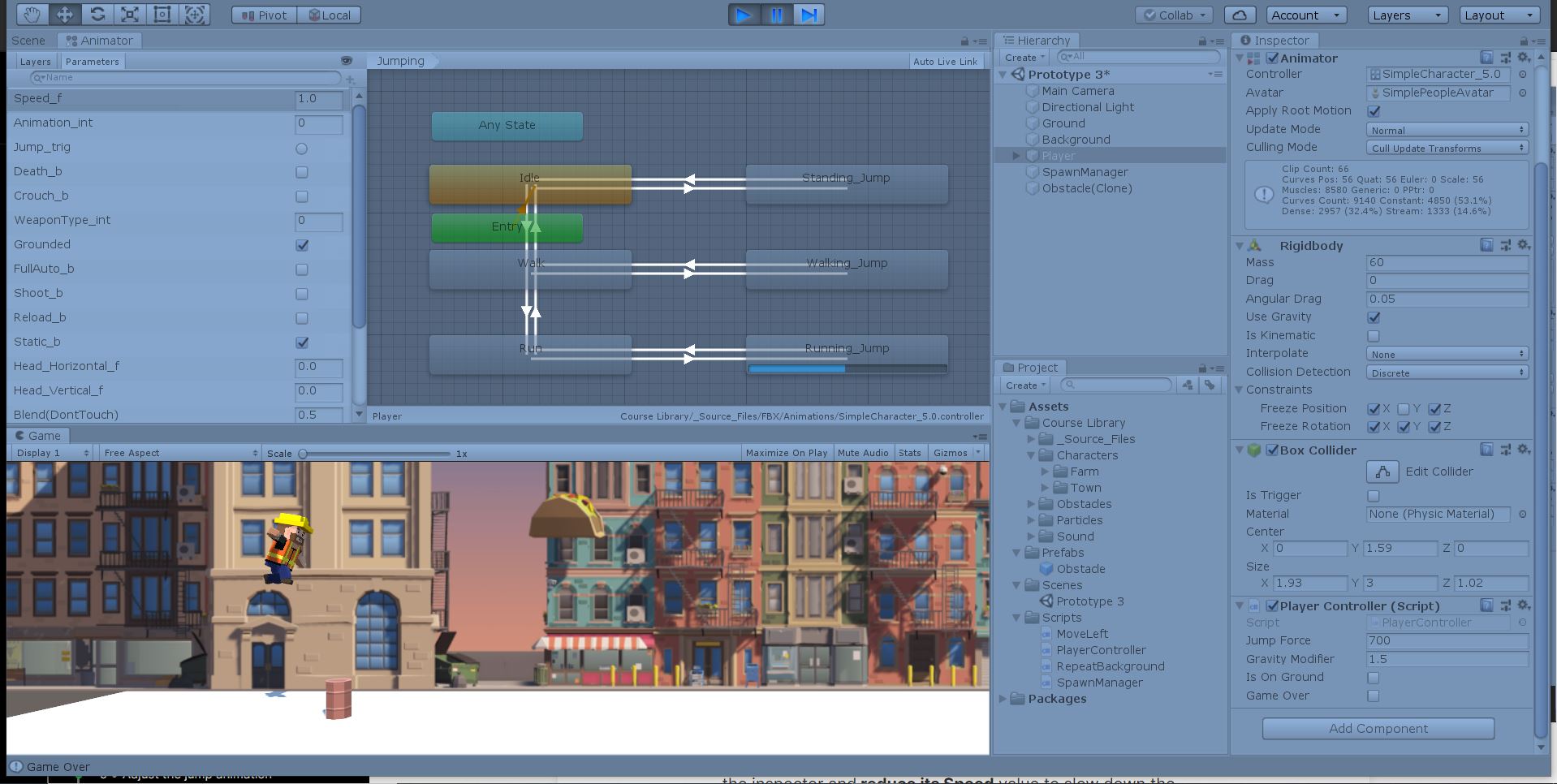
The character was previously static, now he's running. After making him run I added obstacles, one obstacle, but it spawns over and over again. The character could run, but his body was static, I've made the character more limber!!! So now, when the character runs, his arms and legs act as they should.

The obstacle I've added to the game is a a spool from a unity tutorial assets folder. First I had one obstacle and gave the player the ability to jump over it after that worked, I made the obstacle spawn repeatedly over and over as the character ran and leaped over it, the obstacle behind was coded to disappear so it wouldn't just lay there and make the game slow.


Learning about the animator of the character was hard to grasp, but after I understood it, it was fine. Learning more about how the speed, gravity and mass of the player effected how the player ran and jumped over the obstacles gave me more of an understanding of how game mechanics work, in a lot of details.

Now I have a working "First Playable" and I'm seeing it come together so doing some each week is more enjoyable when you know progress is steady, if things were not coming together this would be the worst part of my week. 


Sunday, 15 November 2020

Prototype

 "Prototype"

The week I've been dreading for week, the time has come to design a flipping game. To start I'm using the Unity game engine to make my game, the game engine we've done all the tutorials in through out the weeks of this module.

I have started trying to make my game in Unity. I'm using some tools from the pervious tutorial folders we've downloaded since starting the tutorials back in late September. I've used a background from one as I haven't been able to find on that I'd like to use online, I've googled "3D game background sprites FREE" over and over again and can't find anything useful.

I think I'll be using assets from previous tutorials as I know that they will be compatible together when running in unity at the same time. A bonus of starting the game with assets is the game looks like a functioning game before you get to the heavy coding in visual studio.

I'm still looking for some sort of package on the Unity site for some type of ground I can use instead of a plain white one. I have a lot of work to do, but I just have to be constantly doing something so it doesn't pile up. Luckily for me the previous tutorials we've done have been what my project is supposed to e so I can watch tutorials and use code from the tutorials to help with certain actions that I want to have appear in my game. 

Image Source: My own image!!!

Watching the tutorials again helps me a lot because the coding is very hard to remember, so it's great to have them to fall back on. 


Sunday, 8 November 2020

Game Design Document-GDD

 "Game Design Document"


For this weeks project tasks we had to create a G.D.D, which stands for a game design document, which essentially a document you give to a developer, with that document the programmer should have all they need to create the game you have thought of. Earlier in the week we had some reading on these documents so it gave me more clarity going into creating one myself, I wasn't so nervous.

Here's a link to my G.D.D I created using Dundoc.  When I first opened the document to start typing I was very confused, I had no idea where anything was r where to start typing. So for a while before I started typing away, I started to navigate my way down the map, and read all the headings and subheadings until I knew where everything was going, then I started typing.

I used miro to make the flow chart for a part of the game design document which was very easy as I'm gettig used to creating different boards on their thanks to our group project module that I really love a lot. The G.D.D is a constantly changing document, as the game development process continues new ideas are added and taken away, so there will be edits made to this document as times go on.


Saturday, 24 October 2020

Game Vision Statement

 "Game Vision Statement"

"Run Quest" is a first person running and obstacle dodging game for the PC and all mobile devices including IOS and Android. The players take the role of a hiker as he makes his way through different environments that all have different obstacles for the hiker to prove his ability and boost points to level up within the game. There is no end game, you level up play by play by achieving the necessary points attainable in that level.

Run Quest has taken inspiration from other games with a similar theme and game play. Temple Run and Subway Surfer and two games that fall in the same genre of Run Quest. Both "Temple Run" and "Subway Surfer" are 3D endless running video games. Another genre you could put these games in as, is platform games, what the "platform" in platform games means is that, it involves jumping between platforms or over obstacle, and the player controls the running and jumping with the goal to avoid their character from tripping or falling in the process. A platform game can also be known as a "jump "n" run". These types of games do extremely well especially on mobile gaming platforms where this type of game seems to be more fun to play on small screens as it enhances the gameplay experience and game quality of trying to fill a big screen with random design to fill up space. The market needs a game similar to the games listed above as the mobile games store is lacking diversity, so it's a perfect time in invest and develop a game like this right now in time, it would be a lose to not go ahead with this game as a new no new trends seem to have the growth and popularity as platform games right now. 

Gameplay:

Run Quest is a single player game where the player is avoiding the computer and the tasks its put in the players way. The player can choose from three different environments to start running in which all have different obstacles related to the theme chosen. When the character is running the player can use the arrow keys to go from left to right and up and down. To gain points the player can run through objects along the track that are also related to the location of the character. How the character look and move around the game environment will be basic there will not be a wide range of characters to choose from because it's not necessary and for my level of coding it does not seem attainable to complete within the short time period I have to finish the development of the game before gameplay is possible. Similar platform games have a variety of maps or locations to choose from, for me two to three is attainable. Although the design of the game alters the gameplay the majority of timi will be spent of the development of the game functions, moving, use of arrow keys etc.

Resources:

The resources required for the development of this game are very minimal, as this game is going to designed for function, not aesthetics. The only equipment needed for the game development process is my laptop, the HP Envy 360 13inch and the Unity gaming engine. "Unity" is a cross platform game engine founded in 2005, it has a great record for being a useful and effective program for game development. The other recourses needed for this game to be made are all free, them being my time, energy and effort. Those three combined will be the backbone of this project, along with a little bit of coding. If the national situation changes due to the pandemic and there is an easing of restrictions a great resource for the completion of this project would be the ability to go to the college campus and work with more experienced coders from other years and also lectures who have field experience and gain ideas and bounce things back and forward from one-an-other. 

Additional Links/Resources:

Below I'm going to leave links to different articles and websites that have helped me write and prepare for typing my vision document and that I think can be useful for everybody, hope these websites make this work easier and more understandable, when you understand why you need to create a vision document, writing it out will be a piece of cake. These can be applied to all aspects of creative genres such as music, art, graphic design and video, these principles can be applied as life tools to make projects more achievable. 

Link 1 is from gamescrye.com:   https://gamescrye.com/blog/why-your-game-needs-a-vision-statement/

Link 2 is from Forbes: https://www.forbes.com/sites/forbescoachescouncil/2019/10/08/five-reasons-why-you-need-a-personal-vision-statement-and-how-to-write-one/

Link three is from juegostudios: https://www.juegostudio.com/blog/need-precise-game-design-document


Image Source: pxfuel

Hope you enjoyed reading this blog and it helped you in some way, shape or form, from writing this blog post I've learned more about the game development process, so I hope you learned something new from reading it too!!!.

Saturday, 17 October 2020

Game Idea Research

 "Game Idea Research"

The game idea I have chosen to focus on for the next couple of weeks is "game idea 3", my third game idea is based on sports, I have decided to focus on specifically running. In my previous blog post I gave examples of three games that have inspired to make running the theme of my game, those games are Temple Run 1 & 2, and Subway Surfer, both these games are "running" games, and they both have similar game goals and objectives depending on your level in the game.

For this weeks task we were told to examine three different game mechanics that we could use in our game, before this week I had no idea how game mechanics effecting a game, I had no idea until about an hour ago!!!, but I do now. Both games have similar game mechanics, this makes sense as both games follow a certain theme and objective. One game mechanic they both have is the mobile mechanics of both games, the fact they are both mobile games means they would work differently to tabletop and video games. The mobile mechanics are what make both the games very interactive. When playing you can tilt you phone from side to side to avoid obstacles and gain points in the form of coins or spray paint cans.

From what I've read online, the interaction ability of the game mechanics, is what determines the level of player interaction. A gaming mechanic that appears in both games is "game performance", meaning your character has the ability to power up, and change the player ability.

I found it hard to really get three types of game mechanics, mainly specifics of each and what they are, I found a website, which has made it more clear as to what kind of interaction I have will influence how the game works, it split it into four, Socializers, interacting with players, Explorers, interacting with the game world, Achievers, Acting on the games world and Killers, acting on other players. This made it more clear as to what will influence my game mechanics. 


Image Source: Flickr

The links to where I found helpful information are going to be listed down below, thanks for reading.

Link 1: https://en.wikipedia.org/wiki/Game_mechanics#:~:text=Game%20mechanics%20are%20%22systems%20of,player%20and%20the%20game...&text=In%20other%20words%3A%20what%20happens,the%20player's%20moves%20or%20actions%22.

Link 2: https://uxdesign.cc/designing-your-game-mechanics-based-on-player-types-b16a95fb7f60

Link 3: https://trianglejump.wordpress.com/2016/10/07/game-mechanics-of-temple-run/


Saturday, 10 October 2020

Brainstorming My First Game

"Brainstorming My First Game"

Before I start this blog and go into depth about each game idea, before I started brainstorming game ideas I was putting off starting to do this because I actually don't play any games at all, I haven't had a single game on my last two phones, there just not something  that interest me, that's why I was so eager to keep putting this off.

Game 1 Idea:
So, for game one I decided to make the process of making a game less stressful and more fun, that I base the game of a real hobby that interests me and I really enjoy. I thought about  what games and sports I could use to develop a game that would match the levels of game development I can reach over the course of the semester. So, I came up with using one of my favourite sports to make a game that I think could be easy compared to others. I chose basketball as the theme and idea to base the first game off because you can limit all the actions of the game down to three or four steps. I made a list of bullet points of how the game would be layed out and the basics of it would work. The layout would be based off the arcade game basketball hoop shooting contest, where the whole aim of the game is to get the ball in the hoop as many times as possible, before the timer runs down to zero on the clock. The game starts off by scoring as much points as possible within the time limit, after that the goal of the game becomes to beat the previous score from the last game you played. The game would have a timer, when the timer runs out the ball doesn't come back to you until you click" Play Again". It would work the same way the real arcade game does, you get one ball and when you miss the ball roles back then you continue to shoot, when the time runs out, the games done. The layout of the game would just be basic, the hoop, the ball, the score tracker, and a timer clock, I'd like to think this is a basic level of game development that can be reached over the semester.


Image Source: Pixabay
Game 2 Idea:

Going into the second game idea I decided to keep the same level of coding that I think is required for the first game for the second game so I wasn't shooting above my level game idea by game idea, getting ahead of myself. The layout of the game would be as basic as possible but contain as much detail as it could relative to my level of coding as time goes on. In my head the layout would consist of very little, as I don't really think the aesthetic of the game at our level would be the end all of the marking scheme. There would be a foot, to kick the football, the football itself, the field, from one side just being green and the football net where the objective of the game was just to get the ball into the net. I haven't looked into how difficult it would be to develop a person, as a goalie in a lot of depth, I'm going to assume that it's very difficult, if I'm wrong, you'll see a goalie in the game. The options and how the game would work would be very minimal. One key would give you the ability to move the foot, another to kick the football towards the football net. Another way that you would navigate the game is through direction selection keys, so using different letters on the keyboard to change the direction of where you want the football to go, the middle of the net, the corner, right or left side. The game would also go off a point system, just like the basketball game, the first game, you would set the high score, the game is then based on beating your previous games point, game after game. It would be a very basic game nothing crazy, right now something like kicking a ball into a net seem almost impossible form my experience with unity 3d.

Image Source: Flickr 

Game 3 Idea:

The third game is continuing with the theme of sports and hobbies that I find interesting that will make the whole process of creating my first game somewhat enjoyable to do considering all the time that's going to be put into the creative process. The only experience I've had with game development is the unity 3d tutorials that we have started to complete week by week as preparation for developing our very own game based on something we find interesting or based off games we like to play already. My third game idea is one that seems simple and easy to create as it's based entirely off running. There have been very successful mobile games based off running but are a lot more technical than what I plan on doing such as Temple Run 1 and 2 and Subway Surfer. My game would be similar to the first unity game tutorial where we place a car on a road and drive through the obstacles we put in it's way. My game would be a similar concept. It would be completely based off running and having different obstacles put in place depending on the chosen landscape I decide to go with as the theme of the game. The options I gave myself for the theme were sand, running track or grass as the basis of the game, which then would narrow down the list of different obstacles possible to be created for the game. I f the game was based on the beach, the obstacles the character would have to jump over would be rocks or small streams. If it was on grass, the obstacles would be fences, if around a car park or office, it would be a carboard or wooden box. Which is something we did in the first unity tutorial, put a number of boxes in the cars path.


Image Source: Flickr

Game 4 Idea:

Number four, and I'm already finding it hard to come up with ideas. I do think that for me the aim of the project is to make a game that aesthetically pleasing, it's to make something that's functional and looks, just okay, or better depending on how I advance over the next ten weeks. So, with that being said I've tried to brainstorm game ideas that I'm familiar with and have seen or played recently, which is the car game that was completed in Unity, very basic but functions as it's supposed to, which is what I'm aiming for as of right now. However that game was very basic, there are a lot of car games that follow a basic theme, which is four cars line up on the road or track, the timer runs down, then they drive around crazy maps, in customized cars. I'd like to follow the general theme of those are games  but obviously as time goes on, make changes as they come to me, so it's not a replica of another racing game. The game would start maybe just with one car, doing a straight lap of a track or also including obstacles and the objective of the game would be to maneuver the car around them, or maybe even park the car between the obstacles. To make the game for functional I wouldn't focus on making a crazy selection of cars, for example there would be one car in the game and one course, but there could be more than one task to complete on that one course, it's not crazy or impossible and is 100 percent possible to complete in the time frame, maybe even earlier so I could make the game more advanced after building a strong leg to stand on with a game that actually works how it's intended to.   


Image Source: Flickr

Thanks for reading my blog, hope you had a ok time, that's all good bye for now!!!.


Reading 10-"Doing"

 "Reading week 10" For this week reading task we had to work on the e-book or digital book the entire year group is working togeth...